Purview, Copilot Studio, and Onyx: one governed agent stack.
Onyx discovers every Copilot Studio agent, governs each one under its own Entra ID identity, and scores connector exposure continuously.
The Copilot Studio Security Challenge
Copilot Studio has become the default place for business teams to build AI agents inside Microsoft. Finance teams ship agents that read invoices and update records. HR teams build agents that summarize policy and route requests. Operations teams connect agents to ticketing systems, knowledge bases, and external APIs through the Power Platform connector library.
That maker velocity creates a new security challenge: business-built agents accumulate faster than IAM can keep up. Agents stand up outside the standard provisioning workflow. Connector permissions drift. Maker-scoped connectors grant access to the maker's data regardless of who invokes the agent. Purview handles data classification and Copilot Studio orchestrates agent building. Neither one tells the security architect which agent acted, under whose authority, against which Dataverse table or SharePoint site, at the moment the action lands.
The ability to automatically discover, govern, and secure Copilot agents is vital for enterprises. Onyx makes it easy.
Bringing Copilot Studio into Onyx's Secure AI Control Plane
Onyx integrates with Microsoft Copilot Studio through the Microsoft Graph API. No proxies. No traffic rerouting. No SDK changes for the application teams or business users building agents. Setup uses a delegated or application connection scoped read-only against Copilot Studio agent telemetry.
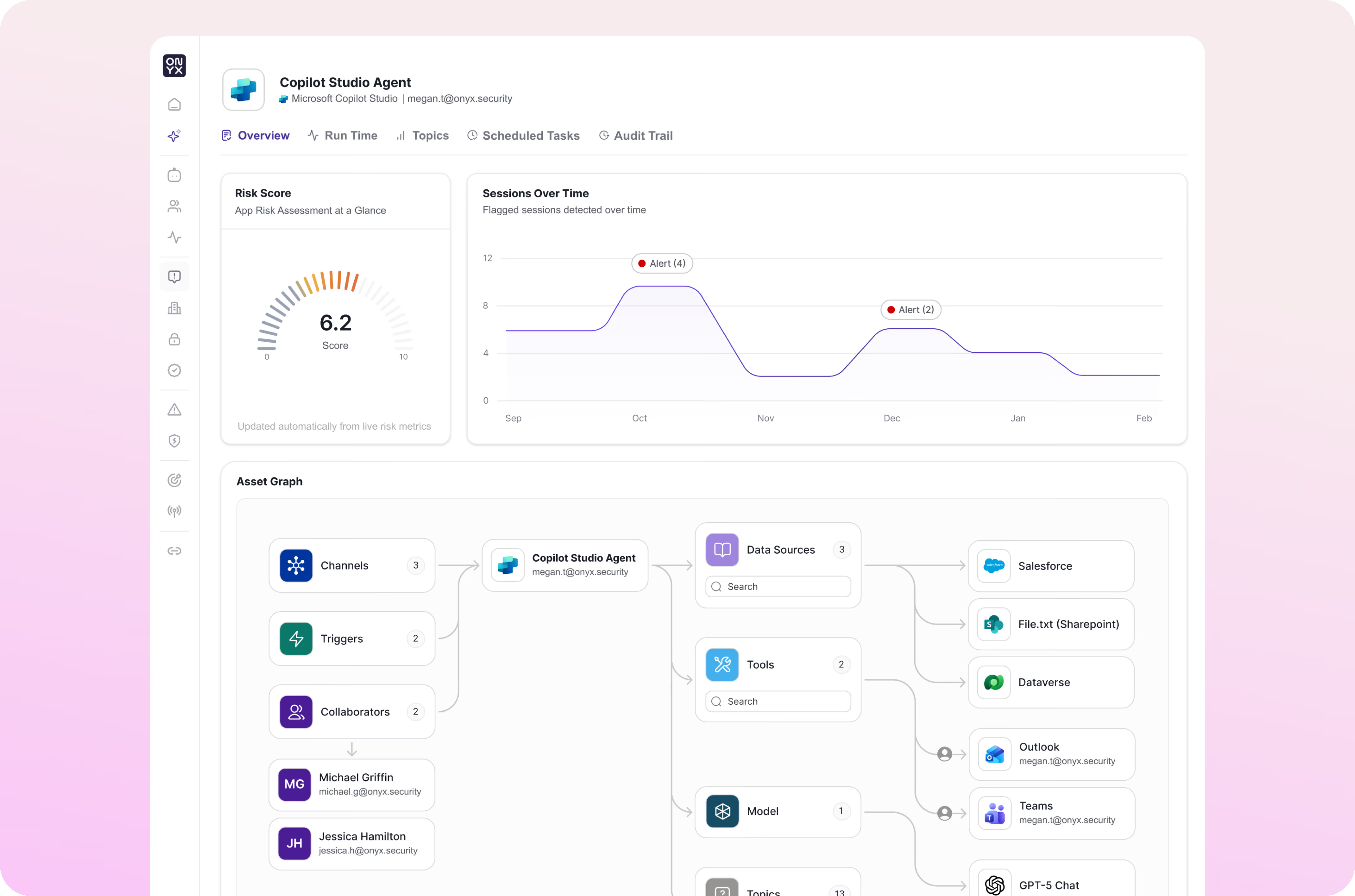
Every Copilot Studio agent in the tenant surfaces on day one, attributed to its Microsoft Entra ID identity (distinct from the user who invoked it), with its full configuration on one record: connectors, scope (maker or user), actions, topics, generative actions, owner, and lifecycle stage. Onyx enriches agent activity in near real time with the Dataverse table queried, the SharePoint site accessed, and the broader AI usage context from the rest of your enterprise.
This feeds into the Onyx model engine, allowing Onyx to continuously assess agent posture, surface zombie agents with active data access and no owner, and alert on every risky configuration before the agent ships.
The Benefits of
Onyx + Microsoft Copilot Studio

Observability
See every Copilot Studio agent in the tenant, the Power Platform connectors it has been granted, the data classes it can reach, and what it has actually done.
Governance
Evaluate Copilot Studio agent activity against natural-language policies, alert on maker-scoped connector exposure, and create an audit trail mapped to OWASP LLM Top 10, NIST AI RMF, MITRE ATLAS, EU AI Act, and ISO 42001.

Security Posture
Continuously assess every Copilot Studio agent for misconfigurations, maker-scope drift, and generative action prompt-injection susceptibility, with Agentic Red Teaming findings translating directly into runtime policy.
Runtime Security
Inspect every prompt, tool call, and Dataverse or SharePoint connector action inline, catch off-scope behavior the moment it would land, and steer the unsafe action toward a safe alternative without stopping the workflow.
Govern Copilot Studio Without Slowing Down Business Teams
Security teams should not have to block Copilot Studio adoption or slow down business-team agent deployment to reduce risk. Onyx lets teams define and enforce natural-language policies across the full Copilot Studio surface, helping protect sensitive Dataverse data, regulated information, and business-critical Power Platform workflows without slowing adoption.
Purview governs the data layer. Copilot Studio orchestrates the agent building experience. Onyx is the agent control plane on top: discovery, identity governance, posture scoring, and runtime enforcement on every prompt, tool call, and connector action. Business users keep building agents; security teams keep the visibility and the controls needed to govern what gets shipped.
To see the impact of real-time AI security with Onyx and Microsoft Copilot Studio, schedule a demo.
Current Onyx customers can get started by following these simple integration steps.
What you'll need before you start
- 1
An Onyx Admin Account
- 2
A Microsoft 365 tenant with Copilot Studio enabled
- 3
A Microsoft Graph API connection authorized for Copilot Studio agent telemetry
In Onyx, select the Microsoft Copilot Studio integration card.
Authorize the Microsoft Graph connection and Onyx will begin discovering and inspecting Copilot Studio agents.